


Itemised Payment Links: A Clearer Way to Request Payment

What Is an Itemised Payment Link and Why Does It Matter?
A customer says yes. The quote is accepted, the job is agreed, and the order is ready to go. Then comes the part that trips up more small businesses than it should: asking to be actually paid.
You send a total. The customer asks what it includes. You explain it again by email. They want to know whether TAX is included. You clarify whether the deposit you already took or the delivery charge that was added late. A payment that should have taken thirty seconds turns into four messages spread across two days.
An itemised payment request fixes most of that before it starts. Instead of sending a bare figure like "$850 due," you list what the customer is actually paying for: the service, the quantity, the fee, the deposit already deducted, so there's nothing left to ask about. Combine that breakdown with a link the customer can pay from immediately, and you've got an itemised payment link: the clarity of a proper bill and the speed of an online checkout, in one message.
For web designers, tradespeople, social agencies, and anyone selling custom or multi-part work, that combination tends to matter more than either half on its own. This guide covers what an itemised payment link actually is, how it differs from an invoice or a bill, what to put in one, and how PaymentLink.io builds this in by default rather than treating it as an extra step.
What is an itemised payment link?
An itemised payment link is an online payment request that shows the customer exactly what they're paying for, broken into individual lines, rather than a single total. Depending on the job, this may include the product or service name, a brief description, quantity, unit price, any applicable TAX or tax, a discount or deposit already applied, a delivery or rush fee, and finally, the total amount due.
The customer opens the link, reads the breakdown, and pays. There's no separate step where they have to ask what's included, because it's already on the page.
It sits in a useful middle ground. It's more detailed than a plain payment link that states a total. Still, it's usually faster to put together than a full formal invoice or a proper e-commerce checkout, which makes it a good fit for one-off jobs, custom orders, and small businesses that don't want a heavyweight process for every transaction.
A web designer, for instance, might send a link that reads:
- Website design deposit: $500
- Copywriting support: $250
- Domain setup assistance: $75
- Tax: $165
- Total due: $990
Nobody on the receiving end needs to ask what's included in that $990. It's already answered.
Itemised payment link, itemised invoice, itemised bill: what's actually different
These terms are used loosely and overlap, but they're not quite the same thing.
An itemised bill breaks down charges after the fact, the kind you'd see in hospitality, healthcare, legal work, or trades, where the customer needs to see exactly what they were charged for.
An itemised invoice is typically a more formal document, used for accounting records, tax purposes, or an accounts payable process, and usually includes payment terms alongside the breakdown.
An itemised payment request is the broader term for any request that shows the breakdown, whatever form it takes. An itemised payment link is the same request delivered as a clickable URL, with a way to pay attached.
A useful shorthand: a bill explains the charges; an invoice formally requests payment and creates a record; a payment link explains the charges and lets the customer pay online in a single step; and a receipt confirms what was paid once it's done. For most small businesses, the real answer isn't "invoice or payment link." It's both: a clear, itemised request the customer can pay immediately, while you still keep whatever invoice or receipt record your business needs.
Why the breakdown actually matters
A vague total invites a question. A clear one usually doesn't, and that difference is most of what itemisation is doing for you.
Customers see the value, not just the price. Nobody enjoys paying a number they don't understand. A photographer charging for shoot time, editing, extra images, and travel looks a lot more reasonable itemised than as one lump sum. Same for a tutor billing multiple sessions plus exam material, a print shop charging for setup, quantity, finish, and delivery, or a tradesperson billing labour, parts, a call-out fee, and waste removal. Roll all of that into one number, and the customer may question it. Break it apart, and the value is obvious.
It heads off the back-and-forth before it starts. "What's this for?" "Does this include delivery?" "Wasn't the deposit already taken off?" "Why is this more than the quote?" None of these questions needs to be asked if the answer is already on the payment page. That doesn't guarantee instant payment; nobody can promise that, but it removes a lot of the avoidable delay that comes from simple uncertainty.
It makes the business look considered. The payment request remains part of the customer's experience when working with you. A vague bank transfer note or a scribbled total in a WhatsApp message can undercut good work, while a clean, itemised, branded request signals that the same care went into the admin as the job itself. For a personal trainer, web designer, or local trade business without a finance department, that detail does much of the trust-building work that a bigger company gets from having proper systems in place.
It removes a step the customer has to take. A traditional invoice can be clear yet still awkward to pay, because the customer has to copy bank details, open their banking app, key in a reference, and message you afterwards to confirm. Put the breakdown and the payment option on the same page, and that whole sequence collapses into one click. Fewer steps mean fewer chances for "I'll do it later" to turn into "I forgot."
It keeps your own records tidier, too. When payment requests are scattered across email, WhatsApp, bank transfers, and the odd handwritten note, it gets genuinely hard to track who's paid, for what, and what's still outstanding. Itemised requests create a cleaner trail of what was asked for and when. Worth being clear here though: PaymentLink.io isn't accounting software and shouldn't replace Xero, QuickBooks, or your accountant. It just keeps the collection stage itself easier to follow.
What belongs in an itemised payment link
A good one should tell the customer everything they need without a follow-up message.
Start with who it's for: the customer's name or business, so nothing gets confused if you're sending several requests a week. Make sure it's clearly branded as coming from you, since a payment page with your logo and colours reassures a customer they're paying the right business, not a generic third-party form.
Write item names in plain language. "Project balance" tells a customer nothing; "website design final balance" tells them exactly what they're clearing. "Extras" becomes "additional product photography edits." "Materials" becomes "replacement tap, fittings, and sealant." If you're billing multiple units, show the quantity: four tutoring sessions, six hours of design work, 500 business cards, one emergency call-out. Where it's useful, show the unit price and line total too, such as "maths tutoring session, 4 x $35 = $140," particularly when the customer is paying for more than one of the same item.
Don't silently fold TAX, discounts, or extra fees into the total. Show them as their own lines: subtotal, deposit already paid, delivery, TAX, total due. A short note helps when context matters, "payment for June tutoring sessions" or "balance due before artwork goes to print," kept brief enough that the page stays easy to scan. And if there's a due date or expectation, state it plainly rather than aggressively: "payment due by Friday 12 July" reads very differently to a customer than a message that sounds like a warning.
When itemising actually pays off.
Not every payment needs a breakdown. If you sell a fixed-price service that the customer already fully understands, a simple link is enough, and adding line items just for the sake of it can make a straightforward request look more complicated than it is.
Itemisation earns its place with custom work, where every job differs from the last: website builds, design packages, photography bookings, video editing, print orders, repair jobs, consulting projects, and events. The customer isn't buying something off the shelf; they're paying for a mix of time, skill, and materials, and the breakdown explains that mix.
It's also the right call for deposits and balances, where a request can show the full project cost, the deposit already paid, what's left, and any fees, so nobody's confused about why today's figure is smaller than the original quote. That pattern suits photographers, web designers, estate agents, and tradespeople who collect payment in stages.
For repeat sessions or bookings, "driving lessons, 5 x 1 hour" or "GCSE maths tutoring, 4 sessions in July" ties the payment directly to the service delivered, which matters when a customer is trying to match what they paid against what they received. And for business customers paying with a company card, a vague link often isn't enough for internal approval or their own records. At the same time, an itemised one gives them what they actually need to authorise it.
What this looks like across a few businesses
A freelance designer billing a branding project might send:
- Logo concept design = $350
- Brand colour palette = $100
- Social media profile assets = $80
- Tax = $106
- Total due = $636.
That reads far better than "branding project payment: $636," because the client can see what they're actually getting for it.
A web designer might break a project into the deposit, the homepage wireframe, contact form setup, mobile optimisation, hosting support, and the final balance, which is particularly useful when the client isn't technical and wouldn't otherwise know what each stage covers.
A tutor sending a request for "GCSE maths tutoring, 4 sessions," an exam paper review, and a revision worksheet pack lets a parent see precisely which sessions and materials they're paying for, rather than a flat monthly number.
A printshop itemising artwork setup, quantity, finish, delivery, and TAX covers a genuinely common source of confusion in that industry, since print pricing has several moving parts that customers rarely think about until they see them separated.
A tradesperson listing the call-out fee, labour, replacement parts, waste disposal, and TAX heads off exactly the kind of dispute that tends to happen when a final bill looks bigger than an initial estimate for reasons the customer was never shown.
Getting paid without chasing: where this matters most for freelancers
Freelancers feel this problem more acutely than most, because there's usually no separate finance team softening the payment conversation. The same person who did the work is the one sending the request, following up when it goes quiet, and deciding how firm to be about it.
An itemised payment link takes a surprising amount of that pressure off. Most freelancer chasing doesn't happen because a client refuses to pay; it happens because the request wasn't clear enough to act on immediately, or because paying required a separate step the client kept putting off. A breakdown removes the first cause. A payment link removes the second. Put together, a client who's already agreed to the work has nothing left to ask and nothing to do except click and pay, which is a genuinely different experience from opening a PDF, finding your bank details, and typing a reference into their banking app three days later.
It also changes the tone of any reminder you do need to send. "Just checking in on the invoice" invites a vague reply. "Here's the payment link again for the $636 branding balance we agreed, itemised below," reads as a normal follow-up on something specific, not a nag. That's a meaningfully easier message to send, and a meaningfully easier one for a client to act on.
PaymentLink.io was built around exactly this gap. Every payment link a freelancer creates carries the same itemised detail as a proper invoice, customer details, a description per line, the amount, and a reference. Once the client pays, that invoice is available for them to download directly. There's no separate document to build afterwards, and no gap between what was requested and what gets filed away for either side's records. If chasing has been the worst part of freelancing for you, this is usually the specific piece worth fixing first: send a payment link that already answers every question before it gets asked.
For a fuller guide on reducing awkward follow-ups, read our article on how freelancers can get paid without chasing clients.
How PaymentLink.io builds itemisation into every request
PaymentLink.io is designed to clearly request payment and let the customer pay online without friction on either side. It runs on Stripe, so you connect your own Stripe account or set one up during onboarding, and Stripe handles the actual processing. At the same time, PaymentLink.io provides the branded request, the payment page, and the workflow around it.
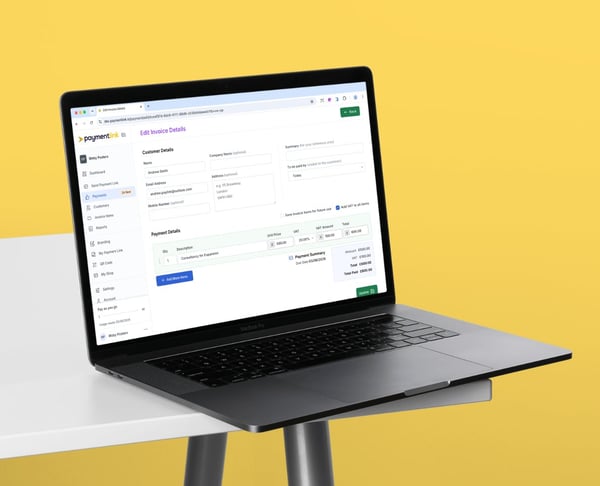
Every request you build can include customer details, itemised line items and amounts, which becomes a single link you send through whichever channel your customer already uses: email, WhatsApp, SMS, messenger, a social DM, a button on your own website, or a QR code for something paid in person. The customer opens it, reviews the breakdown, and pays by card, Apple Pay, or Google Pay wherever Stripe supports them.
A few things worth knowing specifically:
The payment page carries your branding, not a generic third-party checkout screen. This matters because customers are more comfortable entering their card details on a page that clearly belongs to the business they already know and trust. PaymentLink.io offers an in-depth branding section where you can customise your logo, colours, buttons, and page style to match your brand guidelines. You can learn how to set this up in our branding guide.
You're not locked into one channel. Some customers respond faster over email; others over WhatsApp or text. PaymentLink.io lets you send or copy the same link wherever it'll actually be seen.
Every request automatically generates a downloadable invoice. Once a customer pays, they can get their invoice directly from the confirmation, without a follow-up message asking you to send one over.
Everything sits in one dashboard, so you can see what's been sent, what's been paid, and what's still outstanding, rather than reconstructing that picture from three different apps.
None of this replaces your accounting software. PaymentLink.io is the layer that sits between "I need to ask for this payment" and "I've actually been paid," not a substitute for Xero, QuickBooks, or your accountant.
Building one in practice
Start by connecting or creating your Stripe account, since that's the processing layer everything runs on. Then set up your branding, logo, colours, and business identity, so every request looks like it genuinely came from you rather than a generic tool.
From there, start a new payment request and add the customer's details, keeping it specific to that person rather than reusing a generic link with no context. Add each item separately: "website design deposit," "4 x tutoring sessions," "logo design balance," "emergency plumbing call-out," using descriptions a customer would actually recognise rather than internal shorthand. Before sending, check the subtotal, TAX and total, since a small error here is exactly the kind of thing that generates the questions itemisation is meant to prevent.
Then send the link through whatever channel suits that client, with a short note attached if it helps: "Hi Sarah, here's the payment link for your July tutoring sessions. I've broken everything down so you can see what's included." Once they pay, both of you get confirmation, and the record sits in your dashboard rather than buried somewhere you'll have to search for later.
Payment link instead of invoice: when is it better to call
A payment link tends to make more sense than starting from a formal invoice when the customer's already agreed on the price, you need a deposit for a booking, you're collecting for completed work, the order is a simple custom job, or you'd rather avoid manual bank transfer chasing altogether. It's a reasonable default for most day-to-day small business payments.
It shouldn't, though, become a reason to skip proper invoicing, bookkeeping, or tax records where those are genuinely required, particularly for business customers who need a formal document for their own accounts. The practical approach is picking the right tool for the situation in front of you. For many small businesses, PaymentLink.io sits comfortably between a bare payment link, a traditional invoice, and a full online checkout, without forcing a choice among them.
Mistakes worth avoiding
Line items that are too vague still aren't itemised. "Services: $700" tells a customer nothing more than a single total.
Too much detail is its own problem. You don't need to list every internal task; just the parts that affect the price or help the customer see the value.
Hidden fees undo the whole point. A delivery charge, a rush fee, TAX, or a discount buried inside the total is one of the fastest ways to create the exact friction itemisation is supposed to remove.
A link with no message at all feels colder than it needs to. Even one line, "here's the payment link for the completed repair, I've itemised the labour and parts so it's all clear," makes the request feel like it came from a person.
Treating PaymentLink.io as a replacement for proper accounting is the opposite of a mistake. It helps you request and collect payment more clearly. Your bookkeeping and tax process still needs to run alongside it.
Why this matters more for small businesses than big ones
Larger companies have finance teams, dedicated invoicing software, and formal payment processes standing between the work and the money. Most small businesses don't. The person who did the job is usually the same person who sends the request, checks whether it's been paid, and decides when to follow up.
That's exactly why clarity carries so much weight here. An itemised payment link lets a small business ask for money in a way that looks considered, explain the value behind the price, reduce back-and-forth, accept card or digital wallet payments rather than relying solely on bank transfer, and make the whole request easier to track later. It's not only about getting paid faster, though it usually helps with that, too. It's about making the payment moment feel straightforward and fair for both sides, rather than an afterthought bolted onto the end of the work.
Final thoughts
An itemised bill or invoice explains a transaction. An itemised payment link does that and gives the customer an immediate way to settle it, in the same message. For freelancers, tutors, tradeperson, web designer, print shops, and consultants, that combination is usually the difference between a payment that happens the same day and one you're still following up on next week.
With PaymentLink.io, the breakdown and the invoice come from the same request every time, built on Stripe and sent through whatever channel your customer already uses.
Create your first branded, itemised payment link and see what it feels like when a customer has nothing left to ask before they pay.
We’re fanatical about your success.
Start with a 30-day free trial - no restrictions, no monthly commitments or tie-ins.Start changing the way you take payments and make your life easier.


