


Payment Link vs Invoice: Which Gets You Paid Faster?


Quick answer: Payment links are faster, and invoices are more formal
If a customer has already said yes, a payment link will almost always get you paid faster than an invoice. It skips the parts that slow invoices down - hunting for bank details, typing a reference, waiting for someone to log into online banking - and leaves the customer with exactly one thing to do: click and pay.
That doesn't make invoices pointless. Larger clients, VAT records, and formal payment terms still need proper invoicing, and no small business should drop that to save a few days. The real question isn't "which one should I use from now on" - it's which one fits the payment you're asking for right now.
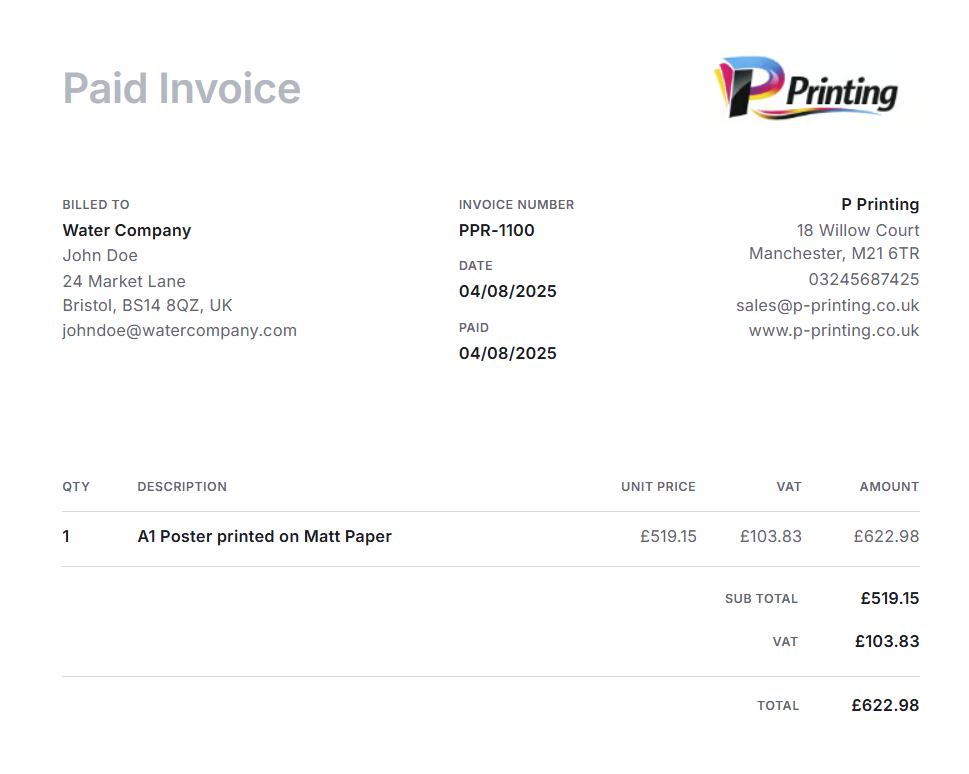
There's a wrinkle worth knowing up front, though: on PaymentLink.io, that question answers itself more often than not. Every payment link you create is automatically an invoice too - itemised, numbered, and available for your customer to download once they've paid. You're not choosing between the fast option and the proper one. You get both from the same link.
What actually separates a payment link from an invoice
A payment link is a URL. Click it, and the customer lands on a page showing what they owe, with a button to pay by card, Apple Pay, or Google Pay. That's the whole job it's built to do.
An invoice is a document. It's built to hold information - your business details, the customer's details, an invoice number, a breakdown of what was supplied, tax details where they apply, payment terms, a due date. Paying is often the last of several steps, not the first.
| Payment link | Invoice | |
|---|---|---|
| Main job | Get the customer to pay right now | Create a formal payment record |
| Best for | Deposits, balances, one-off jobs, simple orders | B2B billing, tax records, payment terms, approvals |
| What the customer does | Clicks and pays | Reviews, files, sometimes routes for approval, then pays |
| Typical speed | Fast | Slower, especially with an approval step |
| Level of detail | Can be as simple or itemised as you need | Usually fully itemised by default |
| Where it works best | WhatsApp, SMS, email, DMs, QR code | Email, accounting software, client portals |
| Where it tends to stall | Customer sometimes still wants a receipt or invoice for their own records | Sits in a queue, or gets forwarded to someone else to deal with |
The way to think about it is that a payment link isn't a rival to the invoice. It's usually the action step a plain invoice is missing - which is exactly the gap PaymentLink.io was built to close. The table above describes payment links in general. A PaymentLink.io payment link carries the itemised detail of an invoice by default - customer details, a description of each item, the amount, and an invoice number - and once it's paid, your customer gets a proper downloadable invoice for their own records, automatically. You don't have to build the invoice and the payment link as two separate jobs.
Why payment links win on speed
Picture what happens the moment a customer says, "Go ahead." With a traditional invoice, you're looking at building it, checking the line items, attaching payment instructions, sending it, and then waiting for them to open it, forward it if needed, log into banking, key in your details and a reference, and finally pay. Every one of those steps is a point at which the payment can stall, even with a customer who genuinely intends to pay.
A payment link collapses all of that into: send the link, they click, they pay, you see it land. There's no separate "how do I actually send this money" step because the payment page handles that for them.
This matters most in situations where the customer is ready to act right then:
- Deposits before a booking, job, or session
- Balance payments once work is finished
- One-off service payments and custom orders
- Sales that start on WhatsApp, Instagram, or a phone call
- Small B2B payments that don't need a full invoicing workflow
- In-person payments via a QR code
- Repeatable services sold through a micro-commerce page
A tutor can send a link the moment a block of lessons is agreed upon. A photographer can take a booking deposit before the date is even in the diary. A print shop can send one once the artwork and price are signed off. In every case, the link keeps the momentum from the "yes" - the customer never has to stop and ask how to pay you.
Why invoices are sometimes the slower - but necessary - option
Invoices aren't slow because they're poorly designed. They're slow because they're built for structure, not speed. A proper invoice often needs an invoice number, a billing address, tax details, line items, a purchase order reference, and payment terms - none of which a quick payment link needs to carry.
In B2B work, that document may also have to be cleared by a finance team or a manager before anyone is authorised to pay it. That's not friction for friction's sake - it's often a genuine requirement of how the business runs. But it does mean the invoice route is rarely the fast route.
There's also a psychological cost: a due date quietly permits people to deal with it later. An invoice due in 14 days tends to get paid closer to day 14, even by customers who could easily have paid on day one. Multiply that by ten unpaid invoices, and it turns into a weekly chasing routine most small businesses would rather not have.
When you should still reach for an invoice
None of this means payment links replace invoices outright. Send an invoice when:
The customer needs a formal record. Companies, schools, charities, agencies, and local authorities often can't pay you at all without one - it's a bookkeeping and approval requirement on their end, not a preference.
There are several line items to account for. Labour, materials, quantities, discounts, VAT - if the customer needs to see the breakdown, an invoice presents it properly. A payment link can still be itemised, but an invoice is built for this by default.
You work on payment terms. 7, 14, or 30-day terms, or milestone billing, need the structure that an invoice provides.
The job is large or complex. A web design project might include a deposit invoice, a milestone invoice, and a final invoice, with a payment link attached to each to actually collect the money.
Your client needs to run it through an approval chain. A purchase order or supplier onboarding process requires a document to attach, not just a link.
One honest caveat: PaymentLink.io isn't accounting software, and nothing here is tax advice. If you're unsure whether your business, industry, or location requires formal invoices, that's a question for an accountant, not a blog post.
The workflow most small businesses actually end up using: both, without the extra work.
In practice, the fastest setup for many businesses isn't "payment link instead of invoice." It's an invoice plus a payment link - the formal record, with no excuse to delay actually paying it. Usually, that means building two separate things: an invoice for the paperwork, and a payment link to attach to it so the customer can pay online instead of via bank transfer.
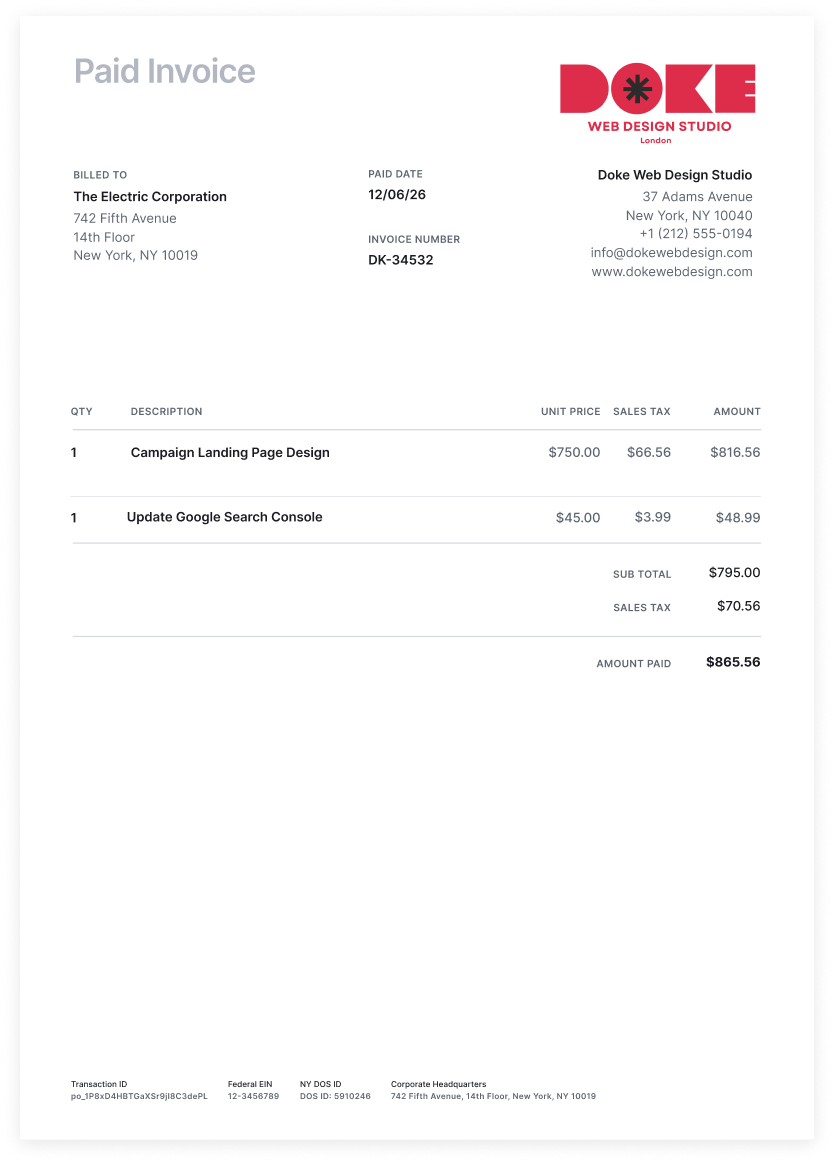
With PaymentLink.io, you only build one. Create the payment link with the customer's details and an itemised breakdown, and you've created the invoice at the same time - same reference number, same line items, same record. Send it, the customer pays, and they can download their invoice straight from the confirmation page. There's no second document to keep in sync, and no risk of the invoice and the payment not matching up later.
A social media agency can send a monthly retainer as a single payment link that doubles as the invoice their client's finance team files away. A web designer can send a deposit link that also serves as the deposit invoice, then a final link for the balance. A tradesperson can send an itemised link for the final balance after a call-out without ever touching a separate invoicing tool. It's the paperwork and the one-click way to pay it, generated from a single request.
Which one is faster, by business type
Freelancers - An invoice still makes sense for retainers, business clients, and larger projects. But a payment link is the better tool for deposits, one-off work, rush edits, and small add-ons where a full invoice would be overkill.
Tutors and coaches - Most individual customers want a fast way to pay for a session or a block of lessons, without an invoicing process getting in the way. Save the formal invoice for the occasional school or organisation that requires one. See payment links for tutors.
Tradespeople and contractors - A payment link or QR code takes the awkwardness out of asking for payment on the doorstep after a call-out. Bigger jobs or business clients are still better served by an invoice. See payment links for tradespeople.
Agencies and consultants - Higher-value, business-to-business work usually calls for an invoice as standard - but a payment link attached to it can turn a 30-day payment term into a same-day one. See payment links for social media agencies.
Print shops and custom order businesses - Most orders start as a conversation, not a checkout. Once the price is agreed, an itemised payment link is sent to pay for the job before production starts. See payment links for printing companies.
Retailers and small sellers - For orders taken over Instagram, Facebook, or WhatsApp, writing an invoice for every sale is rarely worth the admin. A payment link - or a micro-commerce page for anything with a fixed price - does the job faster, with invoices reserved for wholesale or B2B orders. See payment links for retailers and wholesalers.
Making a payment link actually feels fast
A payment link only saves time if the customer doesn't have to think about it. A link that says "Payment" gives them a reason to pause and double-check what it's for - and that pause is exactly the friction you're trying to remove.
Be specific instead: "Logo Design Deposit – 50%" beats "Payment." "Maths Tutoring – 4 Lesson Block" beats "Invoice." "Emergency Plumbing Call-Out – Final Balance" beats "Pay here." A branded, recognisable payment page helps too - customers are far more willing to enter card details somewhere that clearly looks like it belongs to the business they just spoke to, rather than a bare link pasted into a text message.
Where PaymentLink.io fits into this
PaymentLink.io is built for small businesses that want payment to be easy, without having to build a full checkout system or rely solely on manual invoicing. You can put together a payment request with customer details and itemised descriptions, then send it through whatever channel your customer already uses - email, WhatsApp, SMS, or a messaging app. They pay on a simple page by card, Apple Pay, or Google Pay, without needing their own account.
Here's what sets it apart from a plain payment link tool: every payment link you create is also an invoice. You add the same information you'd put on any invoice - customer name, email, address, phone, a summary, and multiple line items - and PaymentLink.io turns it into a single link that's both a live payment request and a proper invoice at once. Once your customer pays, they can download that invoice directly, with no need to ask you for one separately. You get a clean record for your own books. They get the paperwork they might need for expenses or their own accounts. Neither of you had to do anything extra to get it.
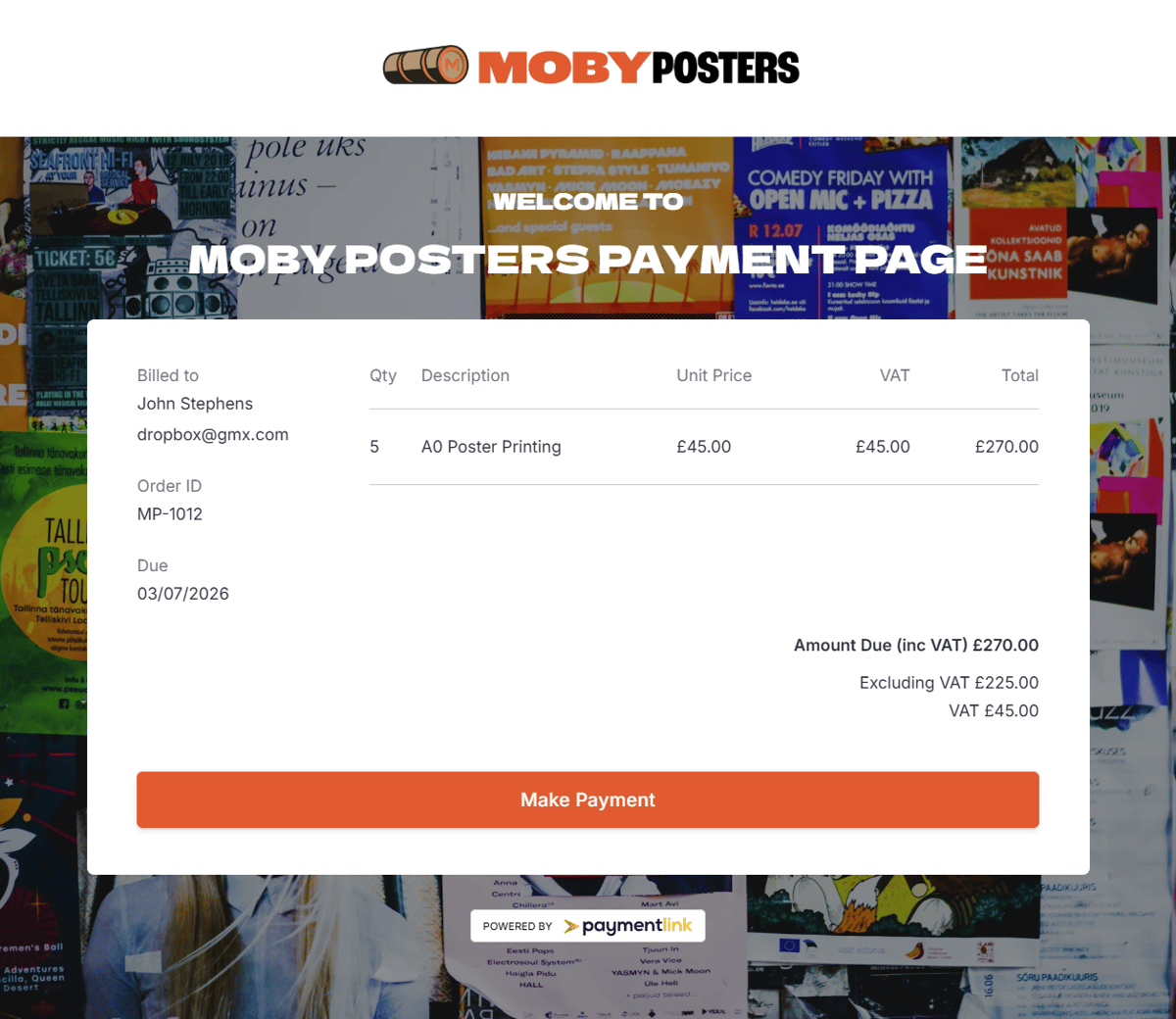
It's built directly on Stripe: connect your existing Stripe account or set one up during onboarding. Stripe handles the underlying payment infrastructure; PaymentLink.io adds the branded link, the payment page, QR payments, the micro-commerce layer, and the invoice generated automatically for each of them. It isn't a replacement for Stripe, and it isn't a replacement for accounting software like Xero or QuickBooks - it's the layer that sits between "I need to ask for money" and "I've actually been paid, with the paperwork already done."
Worth a look:
- Create and send a payment link
- Set up a branded payment page
- Take payments in person by QR code
- Build a micro-commerce page for fixed-price services
- See plans and start a free trial
A quick way to decide
Send a payment link when: the customer has already agreed to pay, the payment is simple, speed matters, you're collecting a deposit or balance, the sale happened over chat or in person, and no formal invoice is required before payment.
Send an invoice when: the customer needs a formal document, they're a business with an accounts process, you need detailed line items or payment terms, the work is part of a larger project, or VAT/tax documentation is required.
Send both when the client needs a formal invoice, but you still want to remove any excuse for a delayed bank transfer - deposits, milestones, and final balances all fit this pattern well. On PaymentLink.io, this is really "send a payment link" - the invoice comes with it.
Mistakes worth avoiding
Sending a full invoice for a tiny, simple payment creates admin nobody needed - a payment link is often enough, depending on your own record-keeping requirements. The reverse mistake is just as common: sending only a payment link to a customer who actually needs an invoice for their own accounts delays things, because they'll come back and ask for one anyway. And whichever you use, don't leave the customer working out how to pay on their own - an unclear or unbranded link looks suspicious, and a payment request with no context invites hesitation, not action. Add a clear description and a reference so you can reconcile it later without having to guess what it was for.
So, which is faster?
For most everyday small business payments, a payment link is faster because it puts the "how do I pay" step directly in front of the customer at the exact moment they're ready to act. An invoice is still the right call when the customer needs documentation, approval, or a proper accounting record. In most other tools, getting both means sending two things. On PaymentLink.io, it means sending one.
Ask yourself one question before deciding: what does this customer actually need before they can pay? If the answer is speed and convenience, send a payment link. If it's records and approval, send an invoice. And if it's genuinely both - which is most of the time - a PaymentLink.io payment link already covers it, since every one you create is an invoice your customer can download the moment they've paid.
Create your first branded payment link or set up your dedicated payment page and give customers a clearer way to pay you, however they reach out.

We’re fanatical about your success.
Start with a 30-day free trial - no restrictions, no monthly commitments or tie-ins.Start changing the way you take payments and make your life easier.


