
How to check if you own your domain name

Your domain name is the lifeblood of your business. It's your website, your emails - the digital connection between you and prospective / existing clients.
Losing your domain name could be catastrophic - and once lost, it could be impossible to get back.
Things you need to understand about domain names
Who owns my domain name
Your domain name is never "owned" - it is rented to you by domain authorities. In case of any disputes, they're the ones that intervene. You'll never hear from them unless there's a trademark / legal issue. ICANN for top-level domains like .com https://www.icann.org/ and Nominet for .co.uk domains https://nominet.uk/
As long as you keep paying your renewal fee, you're free to use the domain name.
But do YOU have access to your own domain?
A lot of people get their IT company or a friend to register and manage their domain names on their behalf, and as long as it's running, they don't have any problems. This is actually a big problem. If you don't have access to your own domain name, you have no control over it, and if any of these people go out of business or you have a dispute, you're stuck. It happens more often than you think.
What does having access to your domain name actually mean?
To understand what access actually means, you need to understand the basics of domain names. It gets very technical, but we'll keep it as simple as possible for now.
Who is your domain registrar
This is the company that you pay for your domain renewal to. To check who your domain registrar is, go here: https://who.is. Type in your domain name,, and with the whois tab selected, scroll down to see the "Registrar" details. If you cannot see it then scroll down to the section "Raw Registry WHOIS Data".
You must have access to your domain registrar's details to log in and see your domain name.
If you're using a 3rd party to manage your domain, despite the excuses they give you, insist on moving your domain into an account that you can access. Then give them access. Most domain registrars allow multiple users, so set them up and give them access. And revoke if ever needed.
Once you have access to the domain control panel, make sure you are the legal owner. Some IT companies register it to themselves, and this means legally you don't own your own domain - they do. Your domain registrar can change this for you. It may take a few steps. The first thing you need to do is contact their support team, and they'll guide you through it.
What are A records, MX records and Nameservers, and how do they work together?
Having access to your domain name handles renewal and ownership, but you also need access to the services your domain name is "linked" to. Your domain name connects to your email services and website hosting.
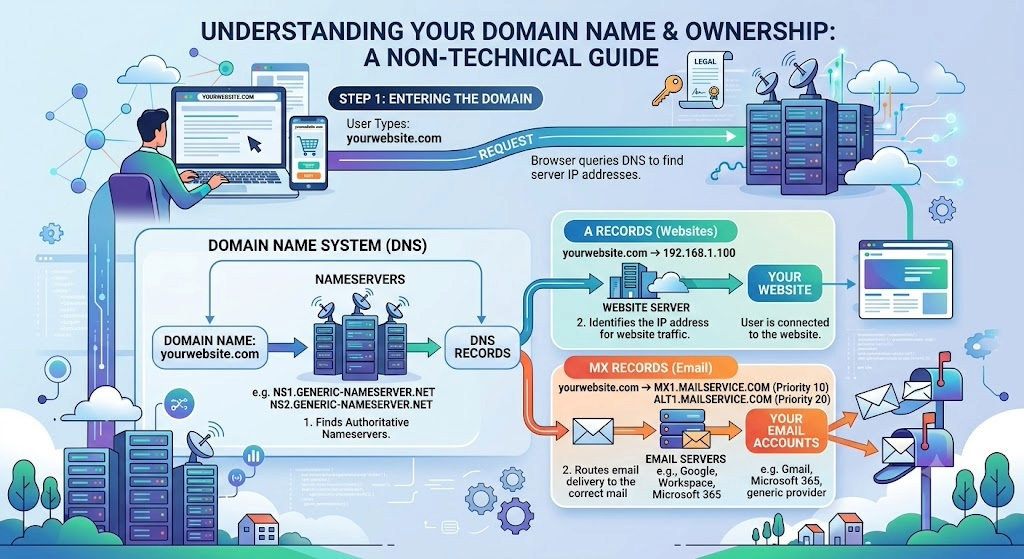
Your domain control panel will have a section called DNS records. Call this the telephone book for your domain. When somebody looks for your website, it tells the internet to go to your website. The same goes for email. There are millions of hosting and email providers, so your DNS records will send users directly to the correct place.
The 2 records you need to know are: A records point to your web server, and MX records point to your mail server.
If you do not know who hosts your website and do not have access to the web server, you could lose your website. Same for emails.
Always know where your domain points to and have access to it.
What are Nameservers and why do they matter
Here's something to keep an eye out for. In the simplest set-up, you'll have your domain, website hosting and emails with one company - your registrar.
However, it is not uncommon to keep the domain with the registrar and use a different company for hosting and for email. It could be for cost or quality reasons. Sometimes the registrar doesn't offer these services.
As we explained, you can point your A and MX records wherever you want through your DNS records. When a domain name is first registered, the nameservers point to your domain registrar by default. Thereafter, modifications can be made if required. If you are working with an IT company, ask them where my nameservers point. If they are pointing to their servers, it means you have lost most control over your domain name. This is not unusual or malicious - it's just the IT company prefers to manage the domain in a different infrastructure. For example,, many IT companies prefer to use Cloudflare to manage domains, as it offers many free services that are beneficial.
Whatever the reason,, you should always know where your nameservers point and have access.
If your nameservers point to a third party, the DNS records in your registrar's settings will not work.
Checklist on how to check who owns and manages your domain name.
- Find out who your domain registrar is and make sure you have access to the domain name.
- Make sure you are the legal registrant for your domain name and that your email is on the account.
- Make sure you set your domain name to auto-renew and have a valid credit card on file.
- Never ignore emails from your registrar. If there is an issue with payment or renewal, they'll contact you. Always check your junk and spam folders.
- Know who is actually providing your emails, and make sure you have direct access to the control panel for this.
- Know who is actually providing your website hosting, and make sure you have direct access to the control panel.
- Know where your nameservers point and make sure you have direct access to them.
- Ask whoever is looking after your nameservers to provide you with a list of all your DNS records. This is the telephone directory of your domain, and in case of any issues, you'll have a record. Ask them if they ever make changes to send you an updated list. This will be full of random names and digits. Don't worry about understanding it.
- Keep these records safe OUTSIDE your email. If your email stops working, you'll need these details. Send them to somebody you trust for a backup.
- Legally, this is all the information you should have. Nobody should restrict your access to this if you are paying for services.
We’re fanatical about your success.
Start with a 30-day free trial - no restrictions, no monthly commitments or tie-ins.Start changing the way you take payments and make your life easier.