


How to Sell Services Online Without a Website

Sell services online without building a full website
Many small businesses delay selling online because they think they need a website, a web developer, a booking system, a checkout page, and a full e-commerce store before they can take payment. For service businesses, that is often too much too soon.
If you sell tutoring, design work, training sessions, photography, repairs, consultancy, lessons, retainers or local services, your first goal is not to build a large website. Your first goal is to make it easy for a customer to say yes and pay.
The UK government estimated that there were 5.7 million private-sector businesses in the UK at the start of 2025, with small and medium-sized businesses making up 99.85% of the business population. Many of those businesses do not need complex online stores to get started. They need simple, practical payment workflows that work from a phone, email, social media profile or direct message. Source: GOV.UK business population estimates.
This is where a payment link becomes useful. Instead of asking a customer to make a bank transfer, download an app, or wait for a formal invoice, you can send them a secure payment page via WhatsApp, SMS, email, messenger, or social media. If you use PaymentLink.io, that payment request can be branded, itemised and connected to your own Stripe account.
Can you sell services online without a website?
Yes. You can sell services online without a website by using social media profiles, online directories, email, WhatsApp, booking conversations, Google Business Profile, marketplaces or referrals to generate interest, then using a payment link or payment page to collect payment.
A website can help later, especially for SEO, trust and long-term brand building. But it is not the only way to start. If the customer already knows what they want, a direct payment link can remove the friction between agreement and payment.
For example, a tutor can send a payment link for a block of lessons. A graphic designer can request a logo design deposit. A personal trainer can sell a pack of sessions. A photographer can collect a booking fee. A tradesperson can request payment after a job. None of those examples requires a full online shop.
Why selling without a website works for service businesses
Service sales often happen through conversation. A customer asks a question, checks availability, agrees on a price and then needs a way to pay. That conversation may happen on WhatsApp, Instagram, Facebook, LinkedIn, email or over the phone.
Ofcom reported that UK adults now spend an average of four and a half hours online per day, with much of that time spent on smartphones and commonly used apps such as WhatsApp, Facebook and Google Maps. That matters because many service buyers are already discovering, discussing, and confirming purchases on mobile devices. Source: Ofcom Online Nation 2025.
DataReportal also reported 55.5 million active social media user identities in the UK in October 2025. That does not mean every account is a unique person, but it does show how important social platforms are for discovery and communication. Source: DataReportal Digital 2026 United Kingdom.
When customers are already talking to you online, sending them elsewhere to find bank details or to wait for paperwork can slow the sale. A clear payment link keeps the customer in the moment.
Step 1: Turn your service into a clear offer
Before you collect payment online, make the service easy to understand. A confused customer is less likely to pay quickly.
Your offer should answer four simple questions:
- What is included?
- How much does it cost?
- When will the service happen or be delivered?
- What does the customer need to do next?
For example, instead of saying “design work”, a graphic designer could offer “Logo concept package, £250, including two concepts and one revision round.” Instead of saying “training”, a personal trainer could offer “Four 1-hour PT sessions, £160, booked over four weeks.”
This makes the payment request easier to send and more likely to be trusted by the customer.
Step 2: Choose where you will sell the service
Without a website, your sales channel becomes the place where customers already find or contact you. This could be:
- Instagram, Facebook, TikTok or LinkedIn
- WhatsApp Business
- Google Business Profile
- Local directories
- Freelance or trade marketplaces
- Referrals from existing customers
- QR codes on flyers, posters, vehicles or printed material
You do not need to use every channel. Pick the one or two places where your customers already speak to you. A driving instructor may use WhatsApp and Facebook. A social media agency may use LinkedIn and email. A tutor may use referrals and local parent groups.
Once the customer is ready, you send the payment link.
Step 3: Send a payment link when the customer is ready to pay
A payment link is a URL that takes the customer to a secure payment page. You can send it via email, WhatsApp, SMS, Messenger, or any channel where you already communicate with customers.
With PaymentLink.io, you can send a payment link for a specific service, customer, amount and description. Customers can pay online by card, Apple Pay or Google Pay, where supported by Stripe.
This is useful when you want to collect payment for:
- A deposit before a booking
- A balance after work is complete
- A fixed-price service
- A custom quote
- A retainer or monthly package
- A one-off session, lesson or appointment
If you regularly send itemised requests, you may also want to read Itemised Payment Links: A Clearer Way to Request Payment. It explains how clearer payment summaries can reduce confusion before a customer pays.
Step 4: Use a branded payment page for repeat customers
If you do not have a website, a dedicated payment page can act as a simple payment destination for your business. Instead of creating a new link each time, you can send customers to a single branded page where they enter their details, amount, and description before paying.
This is helpful for businesses that receive regular payments, mixed payment amounts, or repeat customers. For example, a tutor could keep one payment page for lesson payments. A tradesperson could send customers to a page for job balances. A consultant could use it for ad hoc project payments.
PaymentLink.io lets businesses create their own payment link page, so the payment experience feels more professional than sending bank details in a message.
For more details on trust and branding, read Branded Payment Pages: Build Customer Trust Before They Pay.
Step 5: Sell fixed-price services with a micro e-commerce page
Some services are repeatable. They have a fixed price, a clear description and a simple buying decision. These are ideal for a small service menu.
Examples include:
- One-hour tutoring session
- Four-week personal training package
- Logo audit
- Website maintenance package
- Photography booking fee
- Driving lesson block
- Social media content review
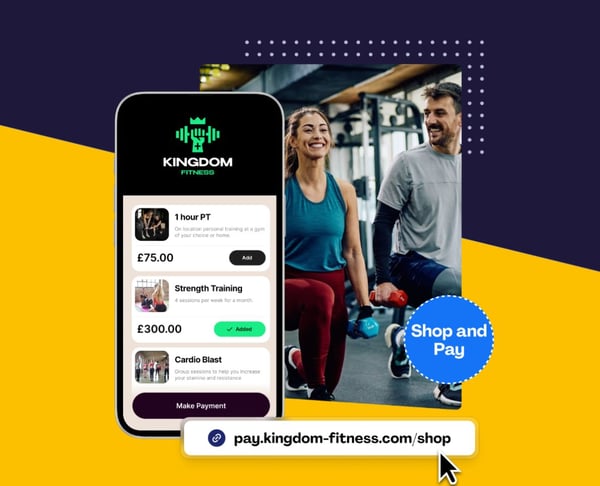
Instead of building a full e-commerce website, you can use a micro e-commerce page. Customers select the service, pay online and receive confirmation. It is a practical middle ground between a single payment link and a full online store.
This works especially well for service businesses that sell a small number of repeatable packages and want to share a single link in their bio, email signature, WhatsApp message, or social media post.
Step 6: Use QR codes for face-to-face service payments
Selling without a website does not only mean selling remotely. You can also take payments in person without a physical card machine by using a QR code that opens a payment page on the customer’s phone.
This can work for personal trainers, driving instructors, tradespeople, event photographers, repair services, pop-up service desks and local businesses. The customer scans the code, checks the payment page and pays online.
With PaymentLink.io, you can use QR code payments as part of your payment workflow. It gives customers a card-style payment option without needing a card terminal for every situation.
Examples of services you can sell without a website
Tutoring and lessons
A tutor can sell single lessons, blocks of five sessions, or exam-preparation packages. The customer may find the tutor through a referral, a local Facebook group, or a WhatsApp message. Once the parent or student agrees, the tutor sends a payment link for the lesson or package. See how this can work for a tutor getting paid online.
Freelance design and web projects
A designer can sell logo packages, brand refreshes, website audits or monthly design retainers through LinkedIn, Instagram or email. Instead of waiting for a bank transfer, they can send a branded payment request for the deposit or final balance. Designers can also explore dedicated pages for graphic designers and web designers.
Fitness and coaching
A personal trainer can sell session packs, online coaching reviews or gym-based programmes through social media and direct messages. A payment link allows the client to pay before or after the agreed-upon session package, depending on how the trainer runs their business. See the personal trainer payment page for more ideas.
Photography
A photographer can collect deposits for shoots, balances after delivery, or fixed-price mini-session bookings. The customer can pay from a mobile phone after confirming the date and package. See how photographers can get paid online.
Trades and local services
A tradesperson can request payment for a call-out, a deposit, a materials contribution, or the final job balance. The link can be sent by SMS or WhatsApp after the quote is accepted or once the job is complete. See how this works for a tradesperson taking payments online.
Agencies and consultants
A consultant or agency can collect payments for strategy sessions, monthly retainers, content packages or project milestones. If chasing invoices is becoming awkward, read How Freelancers Can Get Paid Without Chasing Clients.
What to include before you send the payment link
A payment link works best when the customer understands exactly what they are paying for. Before sending the link, include a short payment message with:
- The customer’s name or business name
- The service being purchased
- The amount due
- Whether it is a deposit, a balance or a full payment
- The delivery date, session date or next step
- A short thank-you message
For example:
Hi Sarah, here is the payment link for your four tutoring sessions in August. The total is £160. Once paid, I’ll confirm the session dates by email. Thank you.
This feels clearer and more professional than sending account details and hoping the customer remembers what the payment is for.
Payment link vs invoice when selling without a website
A payment link and an invoice are not always the same thing. An invoice is often used as an accounting or formal billing document. A payment link is a practical way to enable customers to pay online.
Some businesses will still need invoices for accounting, tax or internal approval reasons. Others need a quick way to collect card payments once a customer agrees to buy. In many cases, the two can work together. You can issue the required paperwork and still include a payment link to make payment easier.
For a deeper comparison, read Payment Link vs Invoice: Which Gets You Paid Faster?.
Why payment links are useful for no-website selling
Payment links are well-suited to no-website selling because they are flexible. You can use them wherever the customer conversation happens. You are not forcing the customer through a full checkout journey. You are giving them a direct, clear way to pay.
They also help reduce common payment friction points:
- No need to copy bank details manually
- No need for the customer to ask “how do I pay?”
- No need to build a full checkout page
- No need to rely only on cash or bank transfer
- No need for every service to be listed on a full website
The Office for National Statistics reported that internet sales accounted for 27.4% of total retail sales in 2025. While this retail figure is not specific to services, it shows how normal online payment behaviour has become for UK consumers. Source: ONS internet sales as a percentage of total retail sales.
How PaymentLink.io helps you sell services without a website
PaymentLink.io is built on Stripe and helps service businesses create branded payment links, dedicated payment pages, QR payments and micro e-commerce pages. You connect your own Stripe account, create the payment request and share the link with your customer.
You can use PaymentLink.io to:
- Create a payment link for a custom service quote
- Build a branded payment page for repeat customer payments
- Sell fixed-price services through a micro e-commerce page
- Use QR codes for in-person payments
- Let customers pay by card, Apple Pay or Google Pay, where supported by Stripe
- Keep the payment experience more professional than sending bank details manually
PaymentLink.io is not a payment processor or accounting platform. Stripe is the payment infrastructure, and Stripe or payment gateway fees still apply. PaymentLink.io gives you a branded payment workflow on top, making it easier for customers to pay.
Common mistakes to avoid when selling services without a website
Making the offer too vague
Do not send a payment link without context. Customers should know what the payment covers, when the service will happen and what happens after payment.
Using too many payment methods at once
If one customer pays by bank transfer, another pays cash, and another pays by card, your records can become messy. A consistent payment workflow helps you stay organised.
Waiting too long to ask for payment
When a customer agrees to buy, send the payment link while the decision is fresh. Delays create more chasing later.
Looking less professional than the service you provide
If your service is high quality, the payment experience should feel clear and trustworthy, too. A branded payment page can help with that.
Do you still need a website later?
A website is useful for SEO, case studies, testimonials, service pages and long-term authority. You may want one as your business grows. But you do not have to wait for a full website before selling your first service online.
Start with the basics: a clear offer, a trusted communication channel and a simple way to pay. Then add a website when you are ready to build a bigger online presence.
Start selling services online with a PaymentLink.io
Selling services online without a website is not about cutting corners. It is about removing unnecessary friction. If your customer already knows what they want, a clear payment link can be enough to move from conversation to payment.
With PaymentLink.io, you can create branded payment links, set up a dedicated payment page, use QR payments and sell fixed-price services through a micro e-commerce page, all without building a full website first.
Create your first payment link or view pricing to start collecting payments online more easily.
We’re fanatical about your success.
Start with a 30-day free trial - no restrictions, no monthly commitments or tie-ins.Start changing the way you take payments and make your life easier.


